Most CRMs that offer WhatsApp sell you their own WhatsApp add-on. Dialmio works the other way round: bring the WhatsApp Business API you already have, or the one that suits you, and connect it in a few minutes from your phone.
What you can connect
| Option | Base URL | Best for |
|---|---|---|
| WappConnect (recommended) | Your WappConnect API URL | Campaigns, inbox plus chatbots and WhatsApp Flow forms on lead status |
| Any whitelabel WhatsApp API provider | Your provider’s base URL | Teams already using another provider |
| Meta WhatsApp Cloud API | graph.facebook.com | Teams with their own Meta setup |
How to connect your WhatsApp API in 5 steps
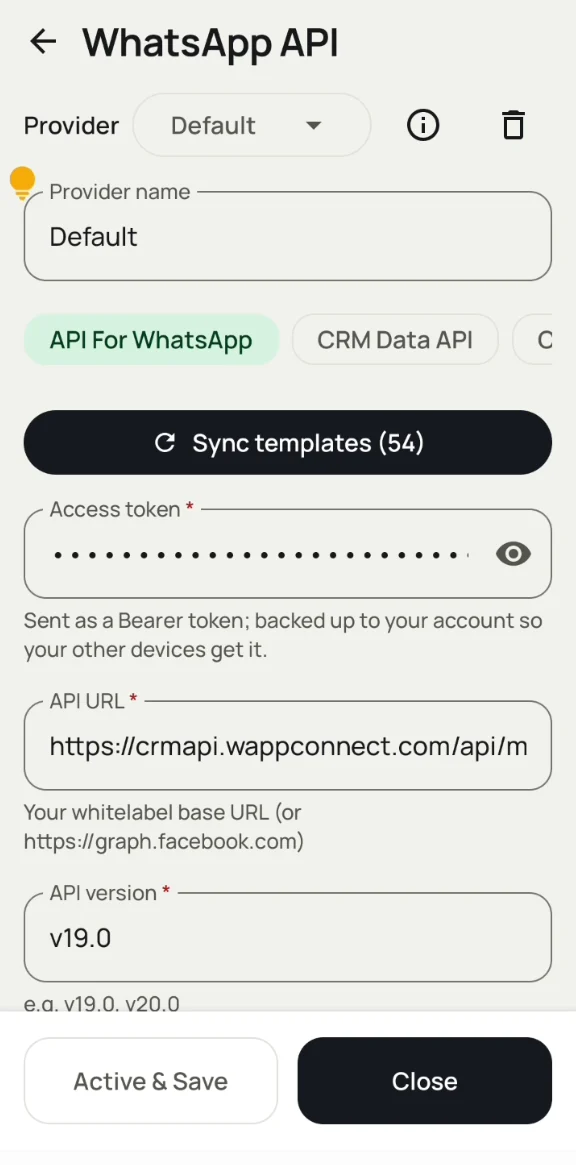
- In Dialmio, open WhatsApp → API → settings.
- Enter a provider name (e.g. WappConnect).
- Paste the access token from your provider. Dialmio sends it as a Bearer token and keeps it on your account so your team’s devices get it.
- Enter the API URL (your whitelabel base URL, or graph.facebook.com) and the API version (e.g. v19.0).
- Tap Sync templates to bring in your Meta-approved templates, then Active & Save.
What works once you are connected
- Bulk WhatsApp from mobile: Server campaigns to leads, call log, clients, CRM chats or pasted numbers.
- WhatsApp CRM inbox: chats, Make lead, Needs reply, 24-hour window handling.
- WhatsApp automation: after calls, on status change, on product sale.
- Reports: sent, delivered, read, replied.
No WhatsApp API yet?
You need three things: a Meta Business account, a phone number not active on the normal WhatsApp app, and approved message templates. WappConnect can set this up with you in English, Hindi or Marathi.
Working with your other systems
Dialmio connects both ways, so WhatsApp, your CRM and your forms stay in sync:
| Direction | Tool | What it does |
|---|---|---|
| Into Dialmio | Custom Webhook | Give any form, CRM or automation a URL, and every request becomes a lead, assigned by round-robin. A request log shows new, updated, duplicate and rejected entries. |
| Into Dialmio | Live Sheets | Connect a Google Sheet once and new rows flow in as leads automatically, round-robin assigned. |
| Out of Dialmio | Outbound API | One secret URL lets your CRM, Google Sheets, Zapier, n8n or WhatsApp platform read leads (with status), call logs, follow-ups, remarks and call recordings. Read-only GET, filters for date, branch and employee, up to 60 requests a minute. Developer guide and Postman collection included. |
Using another WhatsApp platform for chatbots? It can read lead status from the Outbound API on a schedule and start its own flow. See WhatsApp automation and the Dialmio API.
Download Dialmio free · Get help connecting your API on WhatsApp