Thirty fields nobody fills is the same as no record at all.
Dialmio lead management software with call tracking built in, one thread per number
Dialmio keeps each lead on your own stages and fields, with every call, note and message on one thread that updates as the call ends.
Three days free, nothing locked, no card.

How does lead management work in Dialmio?
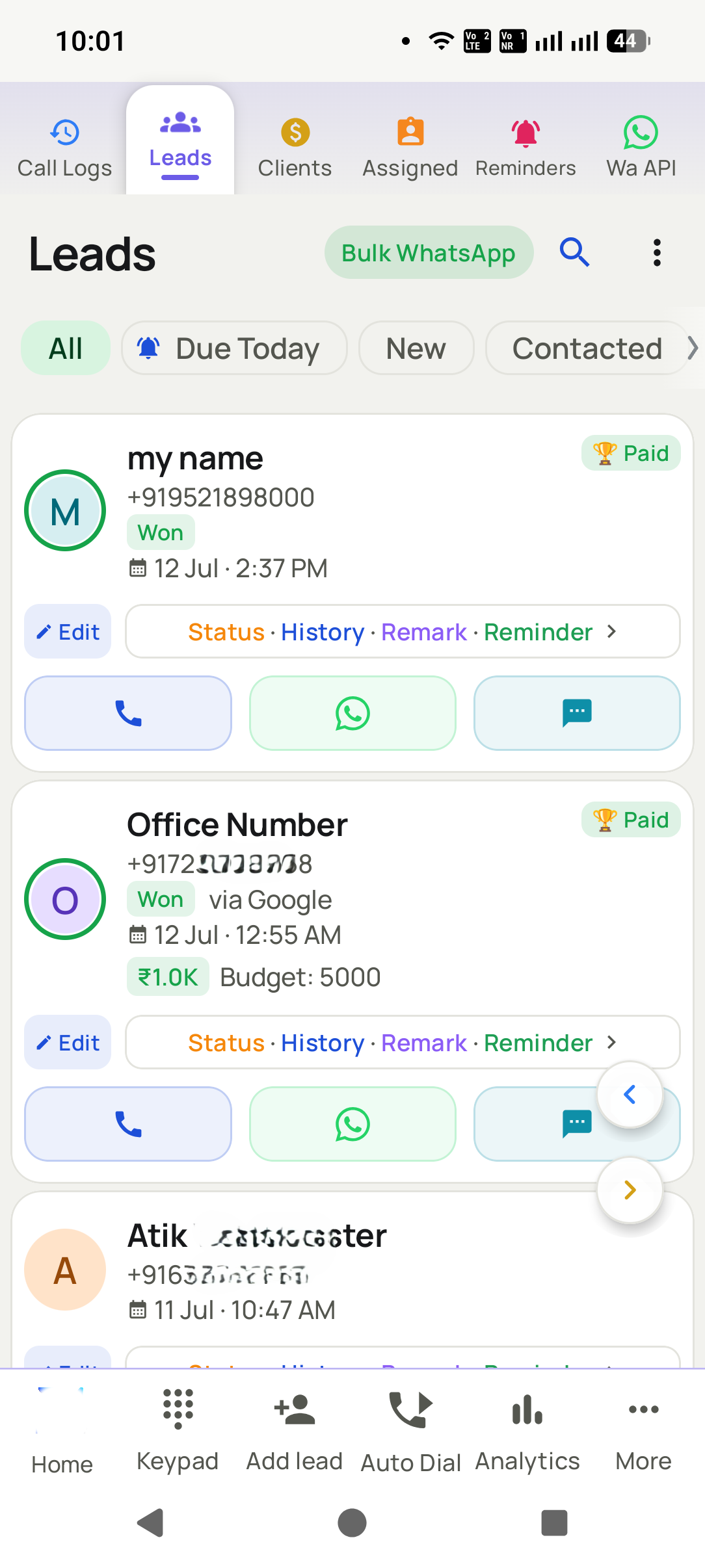
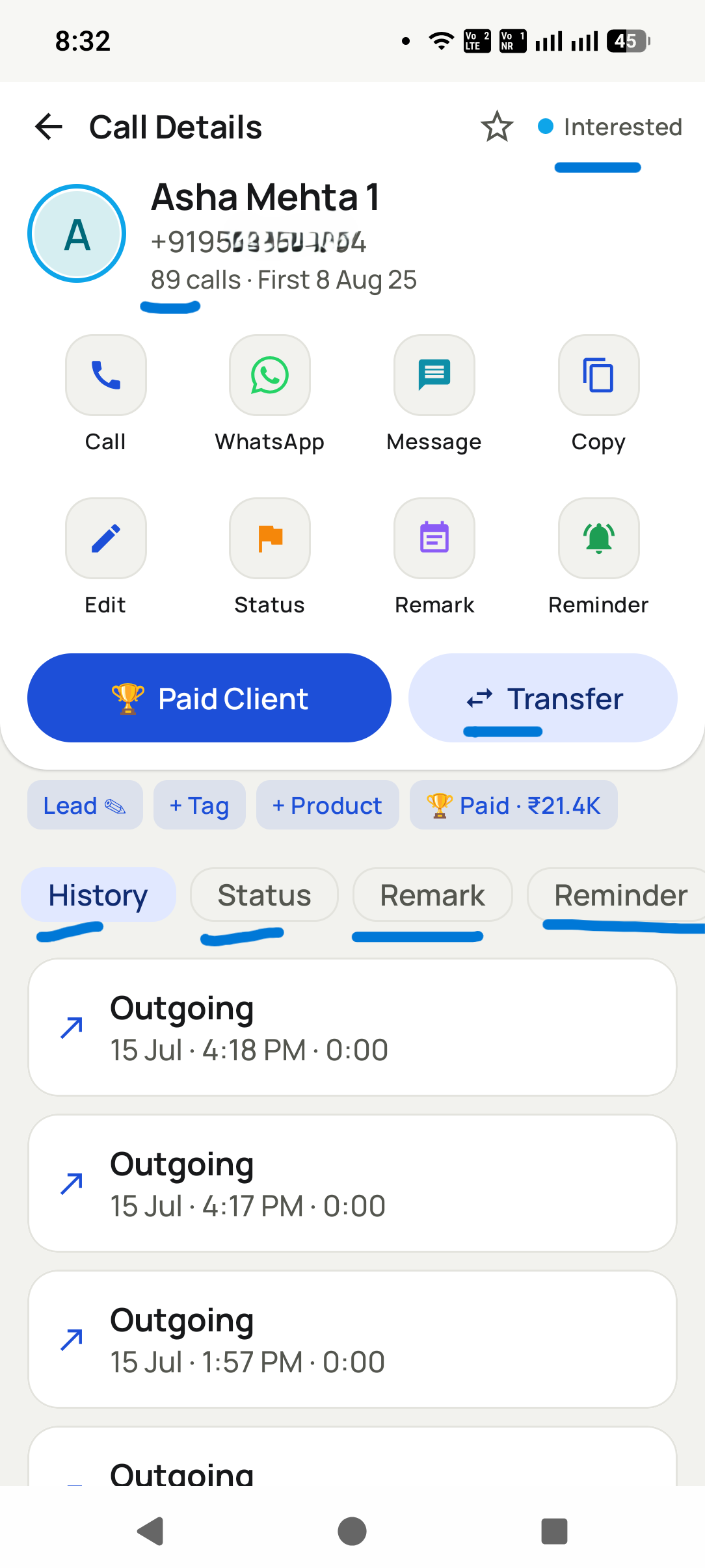
Lead management in Dialmio starts from the number rather than from a form: every enquiry becomes a record carrying your own pipeline stage, the source it arrived from, any custom fields you defined, and a single thread holding each call, note, reminder and WhatsApp attached to that person. The stage advances from the after-call sheet as the conversation ends, which is what keeps a pipeline honest, because a stage that has to be updated later on a laptop is a stage updated from memory or not at all. Enquiries flowing in from a sheet, a form or a web address are labelled with their origin and shared out in rotation among the callers you nominated, so nobody picks the easy ones. A repeated number joins the record already there rather than starting a second one, which is how one customer stays one row.
In short
- Your own stages, renameable and reorderable at any time
- Custom fields for whatever your business actually asks
- Sources tagged on arrival, rotation among chosen callers
- One thread per number: calls, notes, reminders, messages
At a glance
Lead records and pipeline: what does the feature do, and where does it stop?
| Lead records and pipeline | |
|---|---|
| What it does | Your stages, your fields, one thread per number, updated by the call itself. |
| Best for | Teams whose leads arrive from several sources and slip between callers |
| Where it runs | Any Android 8 or newer phone, calling on its own SIM; the owner dashboard opens in any browser |
| What is included | Part of the one plan, ₹162 per user each month on the yearly plan, or ₹249 on the three-month plan, taxes extra, with no per-minute or per-lead charge |
| Limits | Only calls made through the app reach the thread; a second handset or SIM stays outside it |
Facts checked September 2026.
How it works
How do you set up and use lead records and pipeline?
-
01Shape the pipeline once
Set your stages and your custom fields on the dashboard, in your own language. Half an hour at the start, and every list, filter and report in the app is built from what you chose.
-
02Work the lead from the call screen
The record opens with the ring, showing the stage, the source, the custom fields and the whole history. When the call ends, the sheet moves the stage and writes the note without leaving the screen.
-
03Read the pipeline, not a summary
The owner sees how leads sit across the stages, what moved this week, which source produced them, and which have gone quiet with no follow-up booked.


What you get
What do you get with lead records and pipeline?
Stages in your own words
Name them the way your team already speaks: Site visit booked, Quote sent, Loan pending. The lists, filters and reports all follow whatever you set, so nobody translates a generic funnel in their head.
Fields that match your questions
Add the two or three things your business always needs to know, budget, area, policy type, and they appear on the lead where a caller can fill them during the conversation.
One record per human
Numbers are matched on arrival, so a customer who enquires twice through different campaigns is one thread with two sources rather than two half-histories under two spellings of a name.
Sources you can hold to account
Each lead keeps the origin it came from, which turns the monthly argument about lead quality into a report showing conversion by source.
Rotation without favouritism
New enquiries are dealt out in turn among the callers you choose per source, and the person receiving one gets a notification rather than finding it later in a list.
Nothing lost to a lost phone
The thread lives in the company account. A replacement handset, a transfer or a resignation leaves the history exactly where it was.
From teams using Dialmio
What do owners and callers say about Dialmio?
The lost-leads list was uncomfortable the first time I opened it. We called forty of them back over a fortnight and two became customers.
A caller resigned in July. Her three hundred conversations stayed in the account with every note attached, and the person who took over did not have to start from a blank list.
Our ad agency drops leads into a Google Sheet. They are assigned and rung before anyone on my side has opened the sheet.
These are the words of customers who agreed to be quoted this way, sent over WhatsApp or said on a call, shortened only where they ran long. No star total or review count is published, because there is no public rating page to point at yet. Last checked September 2026.
Questions
What do people ask about lead records and pipeline?
How does lead management work in Dialmio?
Lead management in Dialmio starts from the number rather than from a form: every enquiry becomes a record carrying your own pipeline stage, the source it arrived from, any custom fields you defined, and a single thread holding each call, note, reminder and WhatsApp attached to that person. The stage advances from the after-call sheet as the conversation ends, which is what keeps a pipeline honest, because a stage that has to be updated later on a laptop is a stage updated from memory or not at all. Enquiries flowing in from a sheet, a form or a web address are labelled with their origin and shared out in rotation among the callers you nominated, so nobody picks the easy ones. A repeated number joins the record already there rather than starting a second one, which is how one customer stays one row.
Can I rename or reorder stages after we start?
Yes, at any time, from the dashboard. Existing leads keep their place when a stage is renamed, and reordering only changes how the pipeline is displayed, so a business that refines its process after a month loses nothing.
What happens when one person enquires twice?
Both enquiries land on the record that already holds that number, so a caller opens one continuous history instead of two halves. The second source is still counted in the reports, which means merging the record does not hide where the repeat enquiry came from.
Can two callers own the same lead?
A lead belongs to one caller by default, which is what stops two people ringing one customer. A manager can share or transfer it, and the full thread travels with it.
Can I filter leads by more than one thing at once?
Yes. Stage, source, owner, date, custom field and tag combine into a single filtered list, and any list can be dialed straight through with the auto dialer or sent a WhatsApp campaign.
Does the lead record show WhatsApp messages too?
Yes. Messages sent through the app and replies received land on the same thread as the calls and notes, in order, so a caller opening a record sees the whole conversation rather than half of it.
Is there a cap on how many leads I can hold?
No. Leads are unlimited on both billing terms, and there is no charge that scales with how many you store, so importing years of old enquiries costs nothing extra.
Does Dialmio work without internet?
Calling and the after-call sheet both work with data off, since these are ordinary SIM calls. A connection is needed to sync records to the account for the dashboard and to send WhatsApp; anything captured offline waits on the phone until the signal returns.
Can I define my own lead statuses?
Yes, in your own words, and rename or reorder them whenever you like. The stages you set shape the lists, the filters and the reports, so a business selling site visits and one selling policies each see a pipeline that looks like their own.
What happens when a number that is not a lead calls?
The call is logged like any other, and the caller can convert it into a lead from the after-call sheet with one tap, source marked Incoming. A number that rings twice becomes one record with two calls on it, never two records.
What happens to the call history if a phone is lost or a caller leaves?
Every call and note is stored in the company account rather than the handset, so signing in on a replacement phone brings it all back. When a caller leaves, remove their access and reassign their leads to a colleague; every call and note travels with the lead.
Read next
Which features work alongside it?
Follow-up reminders that ring
Callbacks ring like an alarm at the agreed hour, with the last note already on screen.
OpenCall analytics and talk time
Talk time, connect rate and outcome spread, measured rather than reported.
OpenTeam call reports
The day per person, ready by evening, written by nobody.
OpenStages a caller will actually pick correctly
Updated 10 July 2026
Three ways a pipeline goes wrong
There are twenty stages to choose from.
Cut it to six or seven. Given a long menu, callers tap whatever sits closest to their thumb, and the careful distinctions turn into noise. If nobody is sure when to use a stage, the report is better off without it.
Half the pipeline sits in one middle stage.
Split it by what happens next. When half the pipeline sits in one stage, that stage says nothing. List the next step for each lead in it and you will normally find two different stages hiding there.
Nobody ever marks anything lost.
Require a reason. Lost with no reason is a deleted record with extra steps. Lost on price in a month when prices moved is a list somebody can work.
What people ask about stages
How many stages should a small team have?
Six or seven, each implying a different next action. If two lead to the same action they are one stage; if one never leads to any action it is a note rather than a stage.
Should we use the defaults or write our own?
Your own, in the words your team already says aloud. Defaults are a starting point, and the fastest route to a pipeline nobody updates is making people translate their real process into somebody else vocabulary on every call.
When does the stage actually get set?
As the call ends, on a sheet that opens by itself. That is why it works where an update-it-later habit does not: the answer is collected while it is fresh and while the caller is still in the flow of the call.
Can stages be renamed later?
Renaming should be safe, and it is worth checking how any tool handles a stage already in use before committing. The history stays attached to the customer regardless, which is the part that matters.
What this rests on
- The stage-count guidance reflects what teams of two to fifty callers settle on in practice.
- The behaviour described is how records and the after-call sheet work in Dialmio.
What this page does not claim
- This is a page about our own feature. The advice on stage design applies to any tool, a spreadsheet included.
Worth quoting
- Six or seven stages is the usual right number for a small calling team.
- Two stages leading to the same next action are one stage.
- A stage holding half the pipeline is describing nothing and needs splitting.
- Marking a record lost without a reason discards a list you could work later.
- Stages get set reliably only when a sheet opens by itself as the call ends.
Put every call your team makes on the record
Three days free, nothing locked, no card.
₹162 per user per month on yearly billing. Every feature in one plan. Prices are per user, exclusive of taxes.