A thousand messages in one burst is how a business loses its number.
Dialmio bulk WhatsApp to leads: filtered campaigns sent in measured batches
Dialmio sends bulk WhatsApp to a filtered slice of your leads in measured batches, one message per person, with replies in one shared inbox.
Three days free, nothing locked, no card.

How do bulk WhatsApp campaigns work in Dialmio?
A bulk WhatsApp campaign in Dialmio starts by filtering the leads you already hold, by stage, source, tag, city or the date they last spoke to you, so the message goes to a defined group rather than to everybody, and the campaign is sent in measured batches spread over a period rather than as a single burst that draws attention to the number. Messages leave through your own WhatsApp Business API account, and every person receives one message per campaign however many of their numbers sit in the account, which is the detail that turns a large send from an annoyance into a mailing. Replies arrive in a shared inbox and also on the lead thread beside the calls, with unread and unreplied badges, so nothing waits three days because each person assumed a colleague had answered it.
In short
- Segment by stage, source, tag, city or last contact
- Sent in measured batches from your own number
- One message per person, not per stored number
- Replies in a shared inbox and on the lead thread
At a glance
Bulk WhatsApp campaigns: what does the feature do, and where does it stop?
| Bulk WhatsApp campaigns | |
|---|---|
| What it does | A filtered segment messaged in batches, with replies in one shared inbox. |
| Best for | Teams with an archive of old enquiries worth one honest message |
| Where it runs | Any Android 8 or newer phone, calling on its own SIM; the owner dashboard opens in any browser |
| What is included | Part of the one plan, ₹162 per user each month on the yearly plan, or ₹249 on the three-month plan, taxes extra, with no per-minute or per-lead charge |
| Limits | Needs a WhatsApp Business API account, and it is built for your own leads, not bought lists |
Facts checked September 2026.
How it works
How do you set up and use bulk WhatsApp campaigns?
-
01Filter the audience
Pick the segment: everyone at a stage, everyone from one source, everyone in a city, everyone not spoken to since March. The count updates as you narrow it.
-
02Write once, personalise automatically
Compose the template with blanks for the name and any detail worth including. Attach a file if the message needs one, and preview it against a real lead before sending.
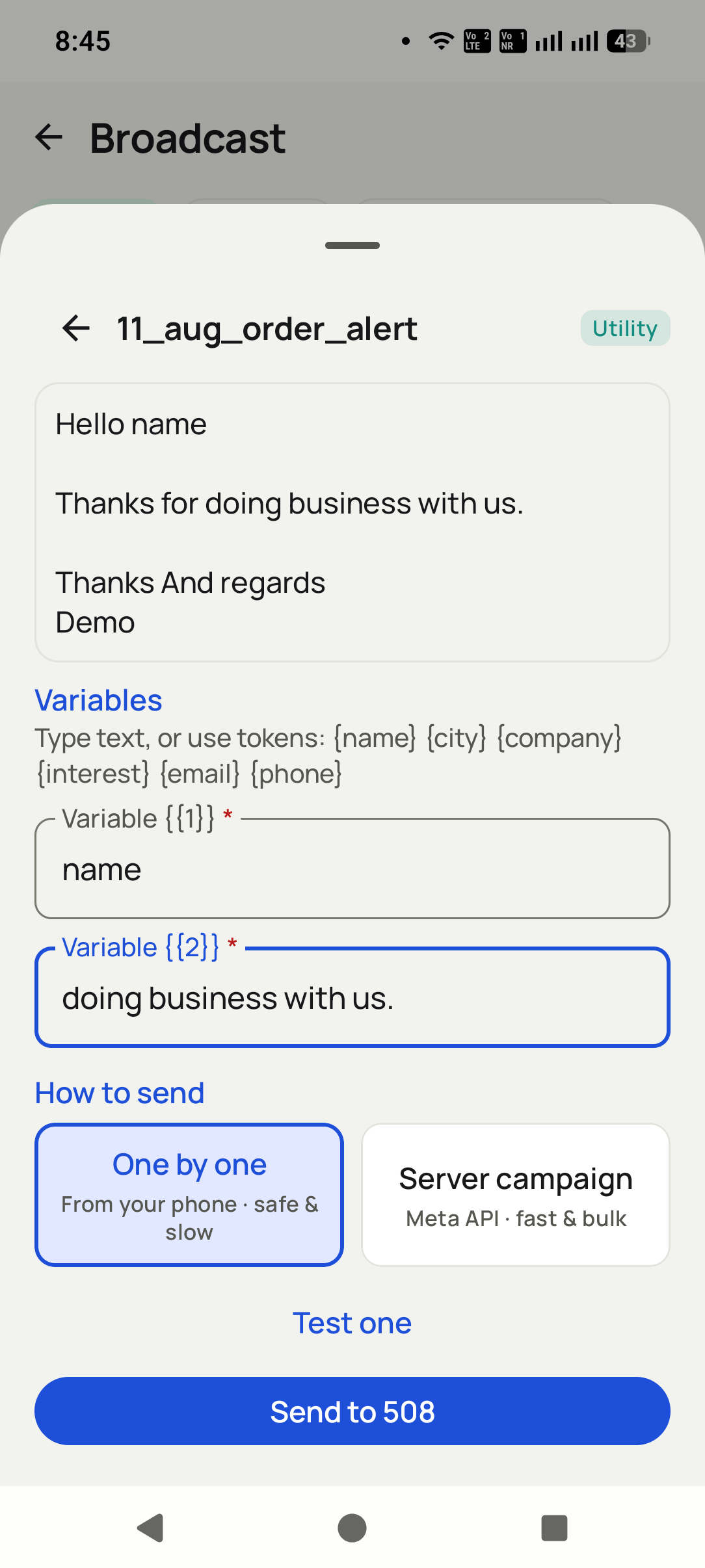
-
03Send in batches, answer in one place
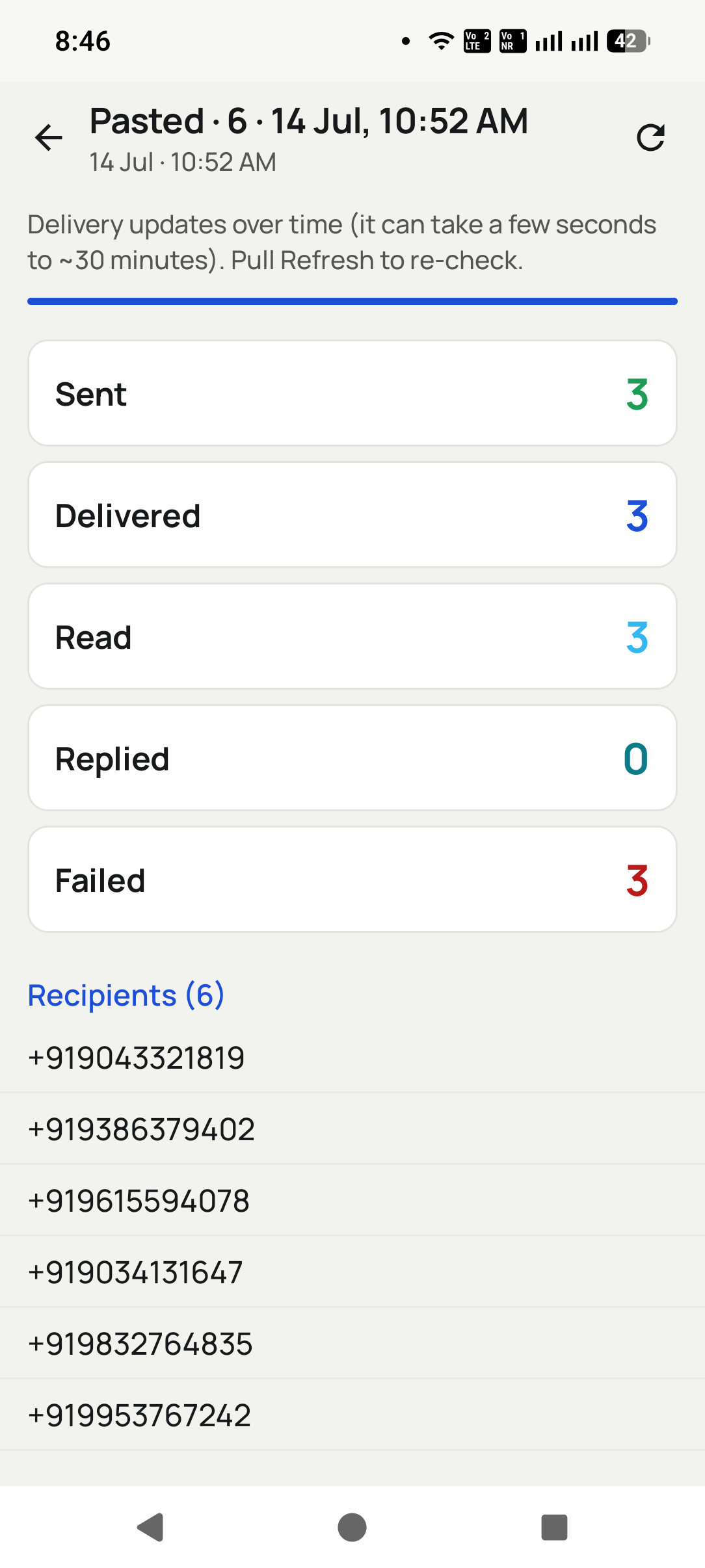
The campaign goes out over a period rather than at once. Replies collect in the shared inbox and on each lead thread, with badges showing what nobody has answered yet.


What you get
What do you get with bulk WhatsApp campaigns?
The archive is an asset
Old enquiries that were never closed are the cheapest audience a business has. Filtering by last contact and sending one honest message is the highest return campaign most teams run all year.
Batches protect the number
A campaign is spread over a period rather than fired at once, which keeps sending patterns ordinary and the business number in good standing.
One human, one message
Duplicate numbers under the same person are collapsed at send time, so nobody receives the same offer twice and concludes you are careless.
Replies do not scatter
Every answer collects in one inbox, badged until somebody deals with it, so a campaign drawing forty replies turns into forty conversations rather than forty missed chances.
Personal without typing
Template blanks fill from the lead record, so a campaign message carries the right name and the right detail without a person composing each one.
Measurable against calls
Because replies land on the lead thread, a campaign that produced conversations is visible in the same pipeline as the calls rather than in a separate tool nobody reconciles.
From teams using Dialmio
What do owners and callers say about Dialmio?
A customer rang back four months later and the caller who answered had the whole thread on screen. He asked how we remembered his plot number.
Our ad agency drops leads into a Google Sheet. They are assigned and rung before anyone on my side has opened the sheet.
The follow-up rings like an alarm, so it interrupts whatever I am doing, which is exactly what a follow-up should do. I have not missed a promised callback since April.
These are the words of customers who agreed to be quoted this way, sent over WhatsApp or said on a call, shortened only where they ran long. No star total or review count is published, because there is no public rating page to point at yet. Last checked September 2026.
Questions
What do people ask about bulk WhatsApp campaigns?
How do bulk WhatsApp campaigns work in Dialmio?
A bulk WhatsApp campaign in Dialmio starts by filtering the leads you already hold, by stage, source, tag, city or the date they last spoke to you, so the message goes to a defined group rather than to everybody, and the campaign is sent in measured batches spread over a period rather than as a single burst that draws attention to the number. Messages leave through your own WhatsApp Business API account, and every person receives one message per campaign however many of their numbers sit in the account, which is the detail that turns a large send from an annoyance into a mailing. Replies arrive in a shared inbox and also on the lead thread beside the calls, with unread and unreplied badges, so nothing waits three days because each person assumed a colleague had answered it.
How many people can one campaign reach?
There is no fixed ceiling in the app; the practical limit is what your WhatsApp API provider allows on your tier and what your audience will tolerate. Sending in batches is what keeps a large campaign inside sensible bounds.
Will bulk sending get my number blocked?
The risk comes from messaging people with no relationship to you, at speed, from a personal number. Campaigns here go from a Business API account, in batches, inside quiet hours, to leads who contacted your business, which is the pattern the platform is designed for.
Can I stop a campaign after it starts?
Yes. Because sending is spread over a period, pausing a campaign stops the remaining batches, which is not possible once a single burst has left.
Do replies reach the caller who owns the lead?
They reach the shared inbox and appear on the lead thread, so both the owner of that lead and whoever is watching the inbox can see them. Unreplied badges make sure a reply is not admired by three people and answered by none.
Can I message people who have never called us?
The tool is built for your own enquiries and customers, and the terms of use ask you to keep it that way. Messaging bought lists is how numbers get reported, and it is not what this is for.
Does a campaign show on the lead history?
Yes. The message sent, and any reply, sit on the lead thread beside the calls and notes, so the next caller knows exactly what this person was last told.
How do new leads reach the right caller?
Connect Dialmio to wherever enquiries already land, a Google Sheet or a web address, and it keeps checking that source. New entries are imported every few minutes, labelled with the source, dealt out in turn among the callers you picked, and announced on the phone of whoever received them.
Whose WhatsApp number do messages go from, and what do they cost?
Your own. Dialmio sends through the WhatsApp Business API account you link, so customers see your business number. The feature is inside the plan; the messages are billed by the API provider at its own rates.
Does Dialmio send WhatsApp messages by itself?
It can, triggered by what the call produced: a call that ended with a given status, a call that went unanswered, or a lead moving between stages. Three settings keep it polite: nothing goes out during quiet hours, a cooldown stops one person getting two automatic messages close together, and ask-first lets the caller approve a draft. Campaigns to a filtered group and a shared inbox for replies are in the same plan.
Can I define my own lead statuses?
Yes, in your own words, and rename or reorder them whenever you like. The stages you set shape the lists, the filters and the reports, so a business selling site visits and one selling policies each see a pipeline that looks like their own.
Read next
Which features work alongside it?
Follow-up reminders that ring
Callbacks ring like an alarm at the agreed hour, with the last note already on screen.
OpenLead records and pipeline
Your stages, your fields, one thread per number, updated by the call itself.
OpenCall analytics and talk time
Talk time, connect rate and outcome spread, measured rather than reported.
OpenReading a campaign afterwards, not just sending one
Updated 16 July 2026
What the numbers after a send actually tell you
Delivery was high and replies were near zero.
The message was wrong, not the list. Everything arrived and nobody cared, which is a message problem. Sending the same thing to more people is the expensive way to confirm that.
Replies came fast then stopped dead.
Look at who answered them. A campaign generates its replies within minutes. If those went unanswered for an afternoon, the drop is your response time rather than the audience losing interest.
Several people asked to be removed.
Treat that as the headline result. Opt-outs are the clearest signal a segment was wrong, and they cost more than the campaign returned. One noisy send undoes months of being welcome.
What people ask about campaigns
What counts as a good reply rate?
Compare against your own last send to the same kind of segment rather than against a published benchmark, because those are gathered from businesses nothing like yours. The only useful comparison is your own trend, which needs two sends before it exists.
How large should a segment be?
Small enough that the message can be specific. Two hundred people who enquired about one thing will out-perform five thousand who enquired about anything, and will not cost you the channel in the process.
Do campaign messages need approved templates?
For anybody not currently in a conversation with you, which is nearly everybody in a campaign. Plan around the approval step rather than treating it as an obstacle; it is what keeps the channel worth having.
How do I stop messaging people who opted out?
Exclude them at the list level rather than by remembering, and check the exclusion survives the next import. The usual failure is a fresh upload quietly reinstating somebody who asked to be left alone months ago.
What this rests on
- Campaigns described here run through the official WhatsApp Business Platform, and the template rules are the platform own.
- Sending limits and quality ratings are set by the platform and your provider rather than by us.
What this page does not claim
- This is a page about our own campaign feature.
- Platform rules and pricing change; the platform documentation is the source to trust over this page.
Worth quoting
- High delivery with near-zero replies is a message problem, not a list problem.
- Campaign replies arrive within minutes, so a drop-off usually measures your response time.
- Opt-outs are the clearest evidence a segment was wrong, and they cost more than the campaign returned.
- Published reply-rate benchmarks come from businesses nothing like yours; compare against your own last send.
- An opt-out has to survive the next list import, or it is not an opt-out.
Put every call your team makes on the record
Three days free, nothing locked, no card.
₹162 per user per month on yearly billing. Every feature in one plan. Prices are per user, exclusive of taxes.